
CHEF iQ App Guide 2026: Ultimate Guided Cooking Walkthrough
CHEF iQ App Guide: The Ultimate Guided Cooking Walkthrough 2026
Everything the app does, explained in plain steps — not just a features list.
If you already own a CHEF iQ Smart Cooker, the hardware is only half the story. Most of what makes it “smart” actually lives in the CHEF iQ app, and it’s easy to open it once, feel a little lost among the tabs, and never explore past the basics.
This guide walks through what each part of the CHEF iQ app does, how a real Guided Cooking session runs from start to finish, and which real recipes already published in the app are worth trying first. For the full breakdown of the hardware itself, see our complete CHEF iQ Smart Cooker review.
Everything below is based on CHEF iQ’s own published app features and recipe library, cross-checked directly rather than guessed at.
What the CHEF iQ App Actually Controls
The CHEF iQ app is the control layer for both the Smart Cooker and the iQ Sense thermometer. It handles four core jobs: remote cook control, Times & Temps presets, Guided Cooking recipes with step-by-step video, and — more recently — Shoppable Recipes that push ingredients straight into an Instacart or Walmart basket.
Find What You Need
The app has a lot going on — here’s where each piece is covered below.
Which App Feature Solves Which Problem
Not every feature matters to every cook — here’s what to reach for depending on what you need.
| If you want… | Use this feature | Why |
|---|---|---|
| Hands-off cooking with no guesswork | Guided Cooking | Sends exact pressure/time settings to the cooker step by step |
| To skip writing a grocery list | Shoppable Recipes | Pushes ingredients straight to Instacart or Walmart |
| Precise doneness on meat | iQ Sense + Live Graph | Tracks internal temperature in real time |
| To cook your own recipe, your way | Times & Temps presets | Manual pressure/time control without a guided recipe |
| To monitor a cook from another room | Cook Control (remote) | WiFi-based monitoring and alerts |
Who Gets the Most Out of Guided Cooking
The CHEF iQ app is built to lower the skill floor for pressure cooking, but it fits some routines better than others. If you’re deciding whether to invest time in learning the CHEF iQ app, these are the cooks who benefit most.
Beginners
The prep list plus step-by-step video removes most of the guesswork that usually comes with a first pressure cooker.
Meal Preppers
Shoppable Recipes let you combine ingredients across several planned meals into a single delivery order.
Busy Weeknight Cooks
Remote monitoring means you can start a cook and step away instead of standing over the stove.
Precision-Focused Cooks
Pairing with the iQ Sense probe and Live Graph view gives real-time internal temperature tracking for proteins.
Who Might Not Need It
If you strongly prefer a physical dial and no app dependency at all, the CHEF iQ ecosystem will feel like an extra step — every function runs through the app, with no manual buttons on the unit itself. Cooks who already have a recipe system they trust (a favorite cookbook, a spreadsheet of times) may also find the guided recipe library redundant, since the Times & Temps presets work fine without it.
Before You Rely on Guided Cooking, Check These
A few quick checks make the CHEF iQ app run smoother from the very first cook.
- Is your home WiFi stable near the cooker? Remote monitoring and notifications depend on it; Bluetooth alone still works for close-range control.
- Do you plan to use the iQ Sense probe? If yes, confirm it’s paired and charged before starting a temperature-guided recipe.
- Are you cooking meat to a specific safety temperature? Cross-check the target with the USDA’s minimum internal temperature chart rather than relying on the app alone.
- Do you want grocery delivery integration? Shoppable Recipes only connects to Instacart or Walmart — confirm one of those services covers your area first.
- Are you prepping ingredients ahead of time? Remember the app only shows exact amounts once, on the prep screen, before the guided steps begin.
Why You Can Trust The Smart Kitchen Finds
The Smart Kitchen Finds is built around one idea: kitchen technology should make cooking easier, not more complicated. We do not recommend appliances or apps simply because they are popular or heavily promoted. A feature has to solve a clear kitchen problem before it earns a place in our guides.
What We Prioritize
Real cooking usefulness, ease of use, and smart features that actually reduce effort rather than add friction.
What We Avoid
Features that look impressive on paper but rarely get used, and claims we can’t verify against an official source.
How We Researched This App Guide
Every feature and recipe named in this CHEF iQ app guide is drawn directly from CHEF iQ’s own app store listings, official blog, and product pages — not from our own hands-on testing of the app, and not invented for the article.
Anything we couldn’t confirm from an official source was left out rather than estimated.
How Often We Update This Guide
This guide is reviewed as CHEF iQ updates the app or expands the recipe library. Features, app screens, and integrations can change, so always confirm the latest version’s behavior inside the app itself.
How a Guided Cooking Session Actually Runs
Here is the real flow, step by step:
- 1. Pick a recipe from the Home tab: Recipes are organized by category, with community-favorite dishes highlighted separately.
- 2. Tap “Start Guided Cooking”: This button, at the top of any recipe page, kicks off the guided flow instead of just showing a static recipe card.
- 3. Do the prep work first: The app lists every ingredient and exact amount before the cook begins — this is the one screen where amounts are shown in full.
- 4. Follow the step-by-step instructions: As you move through each stage, the app sends the matching pressure, time, and temperature settings straight to the Smart Cooker.
- 5. Monitor with Live Graph if a probe is involved: For recipes using the iQ Sense thermometer, switch to the graph view to track internal temperature instead of watching a countdown.
CHEF iQ App Feature Comparison
A quick side-by-side of what each core feature inside the CHEF iQ app needs and who it’s built for.
| Feature | What It Does | Needs iQ Sense? | Skill Level |
|---|---|---|---|
| Guided Cooking | Sends step-by-step parameters automatically | Only for probe-based steps | Beginner-friendly |
| Times & Temps Presets | Manual presets for specific ingredients | No | Intermediate |
| Shoppable Recipes | Sends ingredients to Instacart/Walmart | No | Any level |
| Live Graph | Real-time internal/ambient temp tracking | Yes | Any level |
| Cook Control (remote) | Start/monitor/adjust over WiFi | No | Any level |
CHEF iQ Smart Cooker
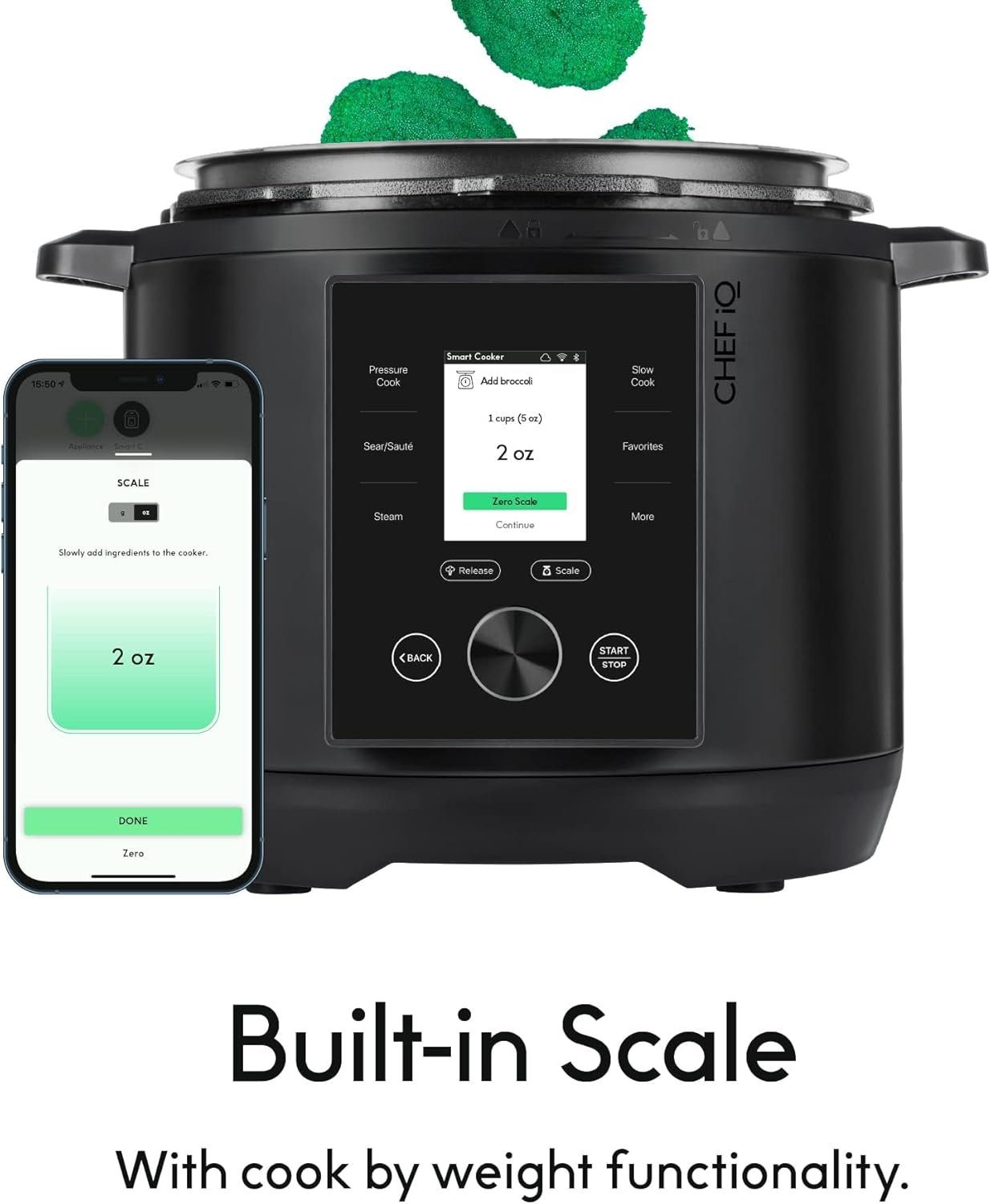
10-in-1 WiFi pressure cooker with a built-in scale
Overview
The Smart Cooker is the appliance the CHEF iQ app was built around. It pairs over WiFi and Bluetooth, includes a built-in scale for measuring by weight, and receives wireless firmware updates that can improve its cooking algorithms over time. It also connects to the iQ Sense thermometer — see how it stacks up against other options in our wireless meat thermometer comparison.
Built-In Scale
Four smart sensors measure ingredients directly in the pot, so you can cook by weight instead of relying on measuring cups.
Auto Pressure Release
Steam releases automatically at the end of a cook, with quick, pulse, and natural release methods programmed in for safety and convenience.
Guided Cooking Integration
This is the part that connects directly back to the app: the Smart Cooker receives its pressure, time, and temperature settings automatically as you move through a Guided Cooking recipe, instead of requiring manual dial input at every stage.
What We Like
- Built-in scale removes a prep step entirely
- Wireless firmware updates keep improving the cooking algorithms
- Guided Cooking removes manual programming for supported recipes
- Works with the iQ Sense thermometer for temperature-sensitive dishes
What Could Be Better
- No manual control dial — everything routes through the app
- A documented power-button reliability complaint exists in a March 2026 user review — see our full warranty and long-term reliability breakdown for details
- Initial Bluetooth pairing can take a little patience
6 Real Recipes Already in the CHEF iQ App
These aren’t hypothetical examples — they’re dishes published in CHEF iQ’s own recipe library and blog, the kind of everyday meals the Guided Cooking system is built around.
1. Classic Beef Stew
A cold-weather staple that leans on the Smart Cooker’s ability to tenderize a tougher cut quickly.
- Chuck roast, carrots, russet potato, onion, garlic
- Beef broth, tomato paste, Worcestershire sauce
- Thyme, bay leaf, peas, parsley; thickened with a cornstarch slurry
2. Beef and Broccoli
A quick Chinese-American staple with a savory sauce base. Swap in tofu or tempeh for a vegetarian version.
- Skirt steak, broccoli, garlic, ginger
- Soy sauce, rice vinegar, dark brown sugar, sesame oil
- Cornstarch for the sauce, sesame seeds and rice to serve
3. Chicken Alfredo
Chicken thighs in a rich Parmesan and cream cheese Alfredo sauce. Whole wheat fettuccine works as a lighter swap.
- Chicken thighs, salt, pepper, olive oil
- Onion, garlic, chicken broth
- Heavy cream, Parmesan, cream cheese, fettuccine
4. Mediterranean Chicken & Rice
A one-pot meal brightened with oregano, parsley, kalamata olives, and feta.
- Chicken thighs, olive oil, white rice
- Chicken broth, oregano, parsley
- Kalamata olives, feta cheese
5. Orange Chicken
Velveted chicken — coated in an egg and cornstarch mixture before cooking — for a tender, takeout-style texture.
- Chicken, egg, cornstarch (for velveting)
- Canola oil for sautéing
- Orange-based sauce components
6. Jambalaya
A Louisiana classic that cooks rice and protein evenly in one pot. Andouille is traditional, but kielbasa works as a substitute.
- Andouille sausage (or kielbasa)
- Rice, aromatics, Cajun seasoning base
Which Recipe Fits Your Cooking Style?
Choose Beef Stew if…
You want a beginner-friendly first Guided Cooking run with a familiar result.
Choose Orange Chicken if…
You want to replace a regular takeout order with a homemade, app-guided version.
Choose Mediterranean Chicken & Rice if…
You want a lighter, one-pot weeknight meal with minimal cleanup.
Choose Jambalaya if…
You want to test the app’s handling of a mixed rice-and-protein dish in one pot.
How to Get Started with Guided Cooking
A few practical scenarios for getting the most out of the app once the Smart Cooker is set up.
First-Time User
Start with Beef Stew or a similarly simple recipe to get comfortable with the prep-list-then-cook rhythm before trying anything more involved.
Meal Prepper
Use Shoppable Recipes to combine ingredients across two or three recipes planned for the week into a single delivery order.
Health-Conscious Cook
Look for recipes with listed whole-grain swaps, like whole wheat fettuccine in the Chicken Alfredo recipe.
iQ Sense Owner
Pair the probe before starting a temperature-sensitive recipe and switch to Live Graph view to track doneness in real time.
Common Mistakes to Avoid With the App
These are the most common ways new owners misuse the CHEF iQ app in their first few cooks.
- Skipping the prep screen. It’s the only place ingredient amounts are shown in full — skip it and you’ll be guessing partway through the guided steps.
- Assuming Bluetooth-only range covers remote monitoring. Notifications and away-from-home monitoring need WiFi, not just Bluetooth.
- Forgetting to charge the iQ Sense probe. Temperature-guided steps won’t track properly with a dead probe.
- Relying on the app alone for food safety temperatures. Cross-check against the USDA’s minimum internal temperature chart for meat and poultry.
- Browsing without using categories. With hundreds of recipes, jumping straight to a category (like Community Favorites) saves time over scrolling blindly.
Frequently Asked Questions
Do I need WiFi to use the CHEF iQ app?
The app connects over both WiFi and Bluetooth. Bluetooth alone covers basic cook control at close range, while WiFi enables remote monitoring and notifications from anywhere.
Can I use the app without following Guided Cooking recipes?
Yes. The Times & Temps presets and manual pressure/time settings work independently of the recipe library, so you can cook your own recipes and just use the app to set the parameters.
What is Shoppable Recipes?
A feature that turns a recipe’s ingredient list into a shopping basket sent to Instacart or Walmart, including the option to merge ingredients from more than one recipe into a single order.
Does the app work with the iQ Sense thermometer too?
Yes — the same app controls both the Smart Cooker and the iQ Sense thermometer, and the two can work together during a single guided cook that needs both pressure cooking and precise temperature monitoring.
Is the recipe library free?
The app itself is free to download, and the Guided Cooking recipe library is included — there’s no separate subscription needed for the core recipes and presets.
Can I substitute ingredients in a Guided Cooking recipe?
The app’s own recipe posts note several swaps (tofu for beef, whole wheat pasta, kielbasa for andouille), so moderate substitutions are expected and generally safe for these dishes.
What happens if my phone loses connection mid-cook?
The Smart Cooker continues running the last settings it received; you’ll need to reconnect to resume monitoring or move to the next guided step.
Do I need to buy the iQ Sense probe separately to use the app?
No — the app’s core Guided Cooking and Shoppable Recipes features work with just the Smart Cooker. The iQ Sense probe adds temperature-specific tracking on top.
Bottom Line: Is the CHEF iQ App Worth Learning?
After walking through every core feature, the CHEF iQ app earns its place for most owners of the Smart Cooker.
For beginners: Yes — the prep-list-then-guided-steps flow removes most of the usual first-time pressure cooking anxiety.
For meal preppers: Yes — Shoppable Recipes turns weekly planning into a few taps instead of a handwritten list.
For cooks who want full manual control: The Times & Temps presets still work without touching the recipe library at all.
Still Not Sure?
Start with Guided Cooking if this is your first pressure cooker and you want the app to remove the guesswork.
Go straight to Times & Temps if you already have your own recipes and just need reliable presets.
Pair with iQ Sense first if you’re mainly cooking proteins where exact doneness matters.
More on the CHEF iQ Ecosystem
Continue exploring the full CHEF iQ cluster on The Smart Kitchen Finds.
- CHEF iQ vs Instant Pot Pro: Which Smart Pressure Cooker Is Better? — side-by-side comparison covering smart features, cooking performance, app experience, and overall value.
- CHEF iQ Smart Cooker Review 2026: Full Hub Guide — our complete research-based review of the cooker itself.
- CHEF iQ Warranty, Reliability & Long-Term Cost Breakdown — what to expect after the first year of ownership.
- Best Wireless Meat Thermometers Compared — how the iQ Sense stacks up against other options.